
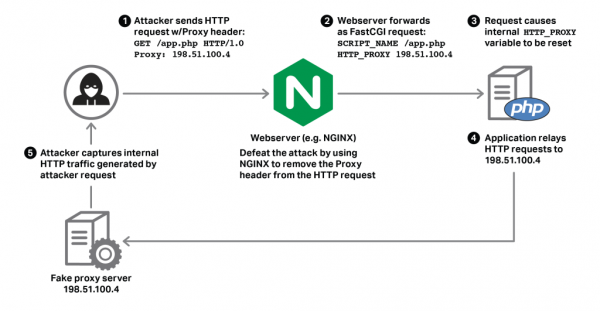
A recent article in Naked Security caught my eye the other day about a new web site vulnerability called HTTPoxy. This stands for HTTP requests and poisoned proxy settings. Most web site use a technology called Common Gateway Interface (CGI) to run applications such as site search, collect information submitted on web forms, display comments, run a forum, or to display database queries such as pricing in a usable form on a web page.
3
AUG
AUG
0
Share
 Cyber-criminals are encrypting your computer files and holding them for ransom. This is one of the most difficult attacks to defend, and once encrypted, impossible to overcome without paying for the decryption key. There are several new tactics appearing on the crypto-ransomware scene that we thought were worth a mention.
 Having just discussed phishing on Monday, it makes sense to cover the social engineering practice called “baiting” today. Typically, this involves an attacker leaving removable media such as a USB flash drive or SD Media card lying around in a public location. The exploit depends entirely on the principle of “finders-keepers.” People pick these drives up, and plug them into the first computer ...
 We continue to hear from security researchers and professionals that an astonishing 95% of all exploits begin with someone opening an attachment or clicking a link on a phishing email. I have a client where two different employees opened the attachment on an email from “FedEx” and became infected with crypto-malware. These incidents happened nearly a week apart, and you think that the ...
 I discovered a while ago that my LG smart phone can be used fairly easily to make a surreptitious video of a meeting simply by turning on the video camera and slipping the phone into a shirt pocket. The camera lens clears the edge of the pocket nicely, and there is no indication, at least on my phone, the the camera is rolling. This is a great way to keep a record ...
 Sometimes in the maelstrom of cybersecurity battles, it is helpful to step back and see where we came from, where we are, and where we are going. This year, in addition to studying for and passing the CISSP exam, I have been to a bunch of security conferences. I’ve been to MISC.conf, Secure360, B-Sides, and the Tech Security Conference. Here are some highlights and ...
 Maybe you like the idea of two-factor authentication, but the Google Authenticator smartphone app seems too cumbersome. Or maybe you are not a smartphone owner, because you don’t like the idea of a phone that can track your location to within a few feet, and keeps sharing all your personal data with the apps on your phone. So you own a flip phone ...
 Google Authenticator is my favorite go-to app for setting up two-factor authentication. But what if you want to remove an account from Google Authenticator?